Photo Booth Camera Settings: 3 to Check
The best camera settings for a photo booth: exposure, power and focus. Starting values for mirrorless cameras, from operators who run their own booths.
Read article →
Chalkak Studio
By the Chalkak Studio team · 23 October 2026
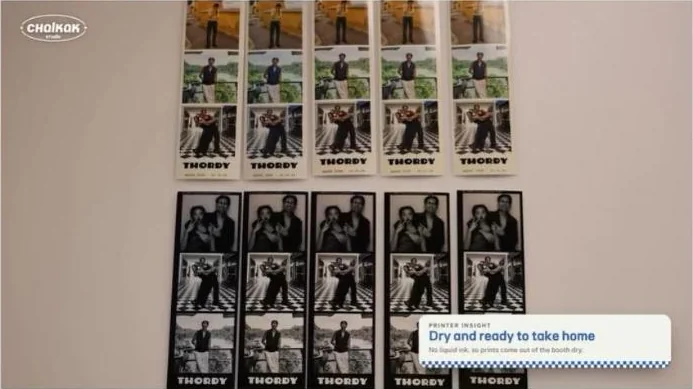
Pick up a strip from a photo booth and it is already dry. No smudges, no waving it in the air, straight into a pocket or a phone case.
That is not quick-drying ink. Most photo booths, including every Korean photo booth machine we build, use a dye sublimation printer. It works in a completely different way from the inkjet printer at home, and knowing how it works makes you a better operator.
This is part 1 of our Printer Insights series. Here is how dye-sublimation printing works, step by step.
Prefer to watch? Watch the 40-second video on our Instagram →
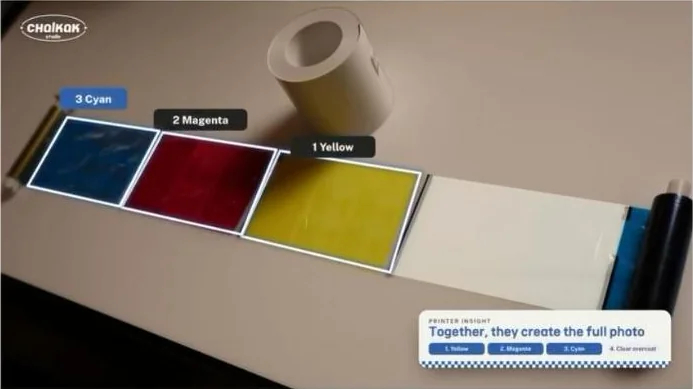
A dye sublimation printer (often shortened to "dye-sub") prints with heat instead of liquid ink. It has no ink cartridges. Instead, it uses two consumables:
The ribbon and paper are usually sold together as a matching media kit. Each kit is designed to produce a set number of prints, so the ribbon and paper run out at the same time.
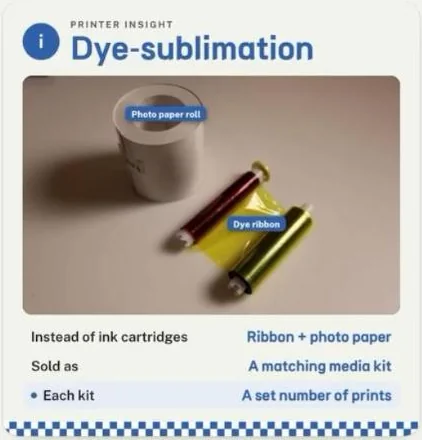
Inside the printer, a heated print head presses the ribbon against the paper. Heat turns the solid dye into a gas, which soaks into the paper's surface. The printer builds the photo one colour at a time:
The print head controls how much heat reaches each dot, so each colour can be lighter or stronger. That is why dye-sub photos have smooth, continuous tones rather than the tiny dot pattern you see on many inkjet prints.
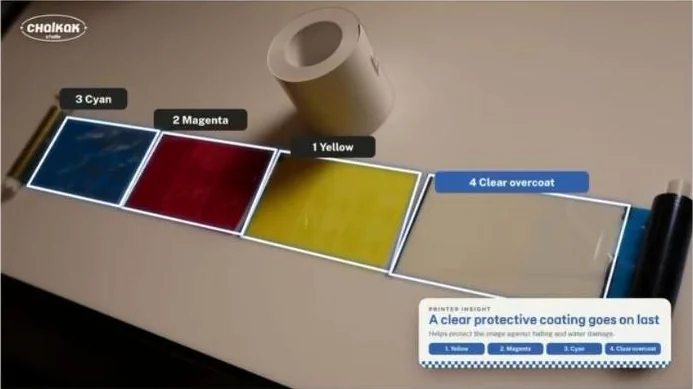
The fourth layer is a clear protective coating, sometimes called the overcoat or laminate. It seals the dye under a thin film, which helps protect the image against fading, fingerprints and water damage.
For a photo booth, this matters. Customers put strips in wallets, stick them on fridges and carry them in phone cases. The overcoat is what keeps them looking good long after the day they were taken.
Because the dye is transferred as a gas, not laid down as wet ink, there is nothing to dry. The print is dry the second it leaves the machine.
That makes a big difference in a busy booth:
| Dye sublimation | Inkjet | |
|---|---|---|
| How it prints | Heat turns dye into gas, absorbed by the paper | Sprays drops of liquid ink |
| Dry when it comes out? | Yes, instantly | Often needs drying time |
| Protective layer | Clear overcoat on every print | Usually none |
| Look | Smooth, continuous tone | Can show a dot pattern up close |
| Consumables | Ribbon + paper media kit | Ink cartridges + paper, used at different rates |
| Cost per print | Fixed and predictable | Varies with how much ink each photo uses |
For a photo booth business, the predictable cost per print is a big advantage. You know exactly how many prints each media kit makes, so pricing and restocking are simple. See our guide to pricing photo booth sessions.
Every Chalkak photo booth uses a DNP DS-RX1HS dye-sublimation printer, made in Japan. It prints in 12 to 15 seconds per photo, makes 700 prints per roll and supports 2x6 strips and 4x6 prints. Media works out at under US$0.10 per print. See the full machine specs.
Knowing how your printer works is the difference between running a booth and babysitting one.
A heated print head turns solid dye on a ribbon into a gas, which the photo paper absorbs. It prints yellow, magenta and cyan one after another, then adds a clear protective overcoat.
Dye-sublimation is why photo booth prints come out dry, sharp and protected. Use matching media, keep the printer cool, and your booth will print consistently every day.
This was part 1 of our Printer Insights series. Follow @chalkak.studio for the next one.
Planning a photo booth business? Compare types of photo booths, or tell us the model and your country and we will send a written quote.
The best camera settings for a photo booth: exposure, power and focus. Starting values for mirrorless cameras, from operators who run their own booths.
Read article →
A practical daily, weekly and monthly maintenance checklist for unattended photo booths, from a team that runs its own booths in Singapore.
Read article →
Standard, high angle, low angle, portable, kiosk and enclosed photo booths compared: photo style, size, weight, price and the best locations for each.
Read article →